Recommended Stats shows your secondary stats against what top players of your spec run, plus their best-in-slot gear, talent builds and a priority list of what they press, right beside your character screen.
Install
- CurseForge app: search for Recommended Stats and click Install.
- By hand: download it from CurseForge and put the RecommendedStats folder in
World of Warcraft\_retail_\Interface\AddOns. - Start the game, or type
/reload.
First use
- Press C to open your character screen. The Recommended Stats panel appears beside it.
- Pick Raid or Mythic+ at the top, so the targets match what you're doing.
- Use the tabs along the top: Stats, BiS, Talents and Priorities.
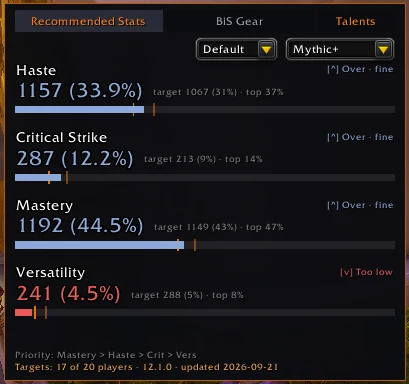
Everything follows your current spec, and hero talents where it matters.
Didn't find your answer?
Ask in the CtrlShiftZed Discord. Questions there help make this wiki better for everyone.
