
TrustCrafter
Remembers who crafted your orders, what quality you asked for and what you actually got, so you can tell at a glance whether a crafter has done good work for you before. Rates, not stars.
Crafting orders, minus the guesswork
Crafting orders are full of crafters you know nothing about. TrustCrafter keeps a private ledger of every order you place, so when you see a crafter again you know straight away how it went last time.
The Crafter Desk
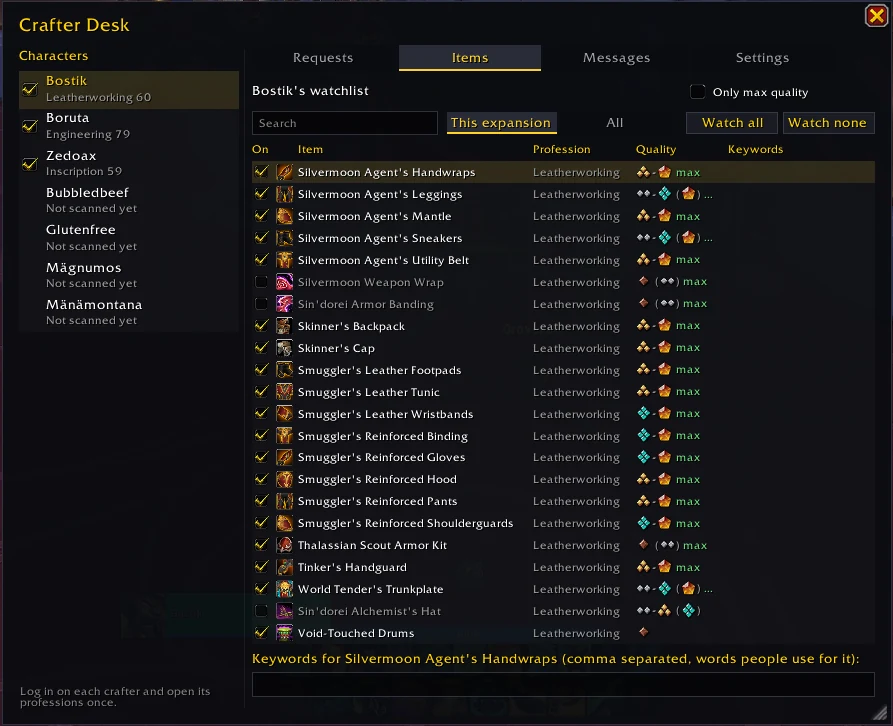
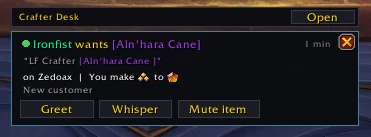
For crafters: TrustCrafter watches Trade, Services and your whispers for people asking for something one of your characters can make. Each alert shows who's asking, which of your characters makes it, the quality you can reach and your history with them, and one click sends a reply in your own words.

Hears how people ask
Item links, the item's name, short forms like "generosity chest", your own keywords per item, and asking for a profession (LF bs, LF jc). Selling posts are ignored.
All your alts
Every crafter on the realm in one list. Tick who to watch for, pick items per character, and the one that makes it at max quality answers, naming the character to send the order to.
The quality you can make
Worked out per character with the best materials, with concentration and with skill reagents. Only max quality keeps a character to what it makes best, and it says which finishing reagent to add.
Replies that sound like you
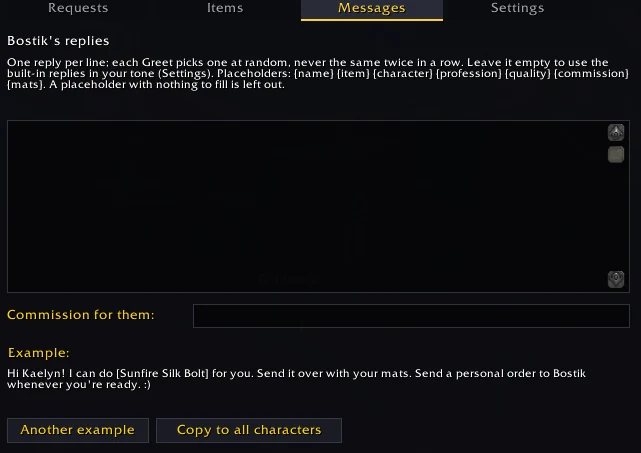
Built in tones, or your own lines per character with {name}, {item}, {character}, {quality} and {commission}. Their own item link goes back to them, so a recraft shows the exact piece.
Never automatic
One click per whisper, one greeting per request and at most 5 a minute. Hover the whisper to read it first. Each request shows when they order and when it's delivered, and quiet ones leave the list after 10 minutes.
Out of your way
A small desk button where you choose, an alert bar you can pin, a desk window you can drag bigger, your pick of alert sound and key bindings. Only in cities and sanctuaries, and every window steps aside in combat and in dungeons, raids and delves, then comes back as it was.
Your order history
Everything in 4.1.0
Automatic order log
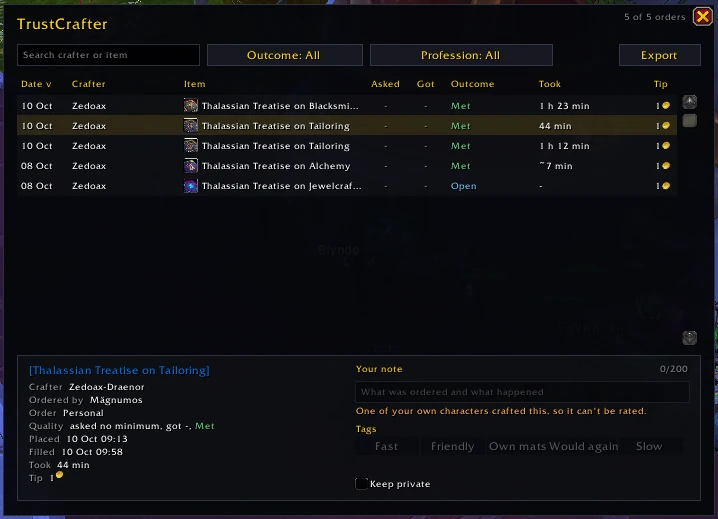
Every crafting order you place is logged with no typing: crafter, quality asked for and received, tip, order type and how long it took. Collecting the crafted item from your mail marks it filled.
Outcomes from facts
Met, Exceeded or Below, worked out from the item you received. Orders nobody filled are kept but never counted against anyone.
Where you need it
Your history on a crafter's tooltip, beside the name when you send a personal order, a tick on My Orders, and in the right-click menu on player names.
Is the crafter online?
A dot beside each crafter: green when online, red when the game says offline, grey when it can't tell. Nothing is sent to the crafter.
History, notes and export
Every order on your realm with /tc or the minimap button. Sort, search and filter, add notes and tags like Fast or Would again, and export to CSV.
Crafted for others
New in 1.2: crafters get a second tab logging every order they fill, with the customer, quality delivered, craft time and tip, plus totals.
Works with CraftScan
New in 1.3: find customers in chat with CraftScan and your history with each one shows in its tooltips, so you know who tips before you answer.
Know your customers
New in 1.4: browsing orders as a crafter, a tick marks customers you've crafted for before, with their tips. Plus an options page.
Realm sharing
New in 3.0: ask other TrustCrafter users on your realm about a crafter, on a hidden channel you never see in chat. Always shown apart as unverified.
Find a Crafter
New in 3.1: one click on a personal order shows who on your realm knows the recipe, sorted by your history and their reviews. Use puts their name on the order.
Get found as a crafter
New in 3.1: your characters are listed when someone searches for a recipe you know, with your skill, a short note and whether you're available, busy or away. You choose if your alts show.
Crafter Desk
New in 4.0: alerts when someone in trade chat asks for something your characters make, with quality, history and a one click reply. New in 4.1: Ordered and Delivered on every request, and a bigger window.
Built to be hard to game
The addon records the facts. You only add your opinion on top, and only for orders you actually placed.
Rating protection
No order, no ratingOnly the character who placed an order can rate it.No rating yourselfOrders crafted by one of your own characters can't be rated.Facts are lockedQuality asked for, quality received and times can't be edited.Met means metThere is no "failed" button. An order that hit the quality you asked for always shows as met.Time is contextTurnaround is shown as a number, never as a score. They might have been asleep.Guild and realm sharing you can check
Turn it on and TrustCrafter asks your guild, and if you like your realm, how their orders with a crafter went. When the crafter runs TrustCrafter too, each order is checked against their own log.
ConfirmedBoth sides logged the same order and quality.DisputedThe crafter's log says a different quality.No recordThe crafter has no record of this order.Not checkedThe crafter doesn't run TrustCrafter or wasn't online.Off until you turn it on. Tips and notes marked private never leave your computer. Realm answers always show on their own line, counted by people, and you can ignore anyone.
Commands and roadmap
Commands
/tcOpen or close your order history (or click the minimap button)./tc lookup NameWhat you know about a crafter (no name: your target)./tc exportCopy your orders as CSV for a spreadsheet./tc tooltipTurn the tooltip line on or off./tc optionsOpen the options page./tc minimapHide or show the minimap button./tc wipeDelete your history on this realm (asks first)./tc realmWhether the realm channel is connected./tc busyMark yourself busy (or not) for Find a Crafter./tc awayMark yourself away (or not). /tc available clears both./tc note textA short note customers see when they find you./tc deskThe Crafter Desk: requests, watchlists, replies and settings (or Shift-click the minimap button).Everything is kept per realm, because public crafting orders only reach crafters on your own realm.
Roadmap






Enjoying the addons? They're free and always will be. If you'd like to help keep the updates coming, buy me a coffee, or become a supporter on Patreon and get the Patreon Supporter role on Discord.