
Turn on Watch chat for crafting requests in the options, or open /tc desk > Settings.
When someone in Trade, Services or a whisper asks for something one of your characters can craft, an alert shows who, what, which of your characters makes it, the quality you can reach, the material cost (with Auction Coach), your history with them and how often it was asked today.
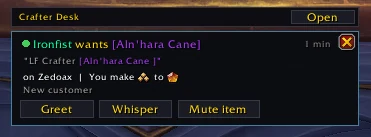
What counts as a request
A message with a request word (LF, WTB, need, recraft...) and no ignore word (WTS, LFW, selling...). Both lists are editable, and a test box shows what any chat line would do. Matches include item links, your own keywords, item names and asking for your profession by name.
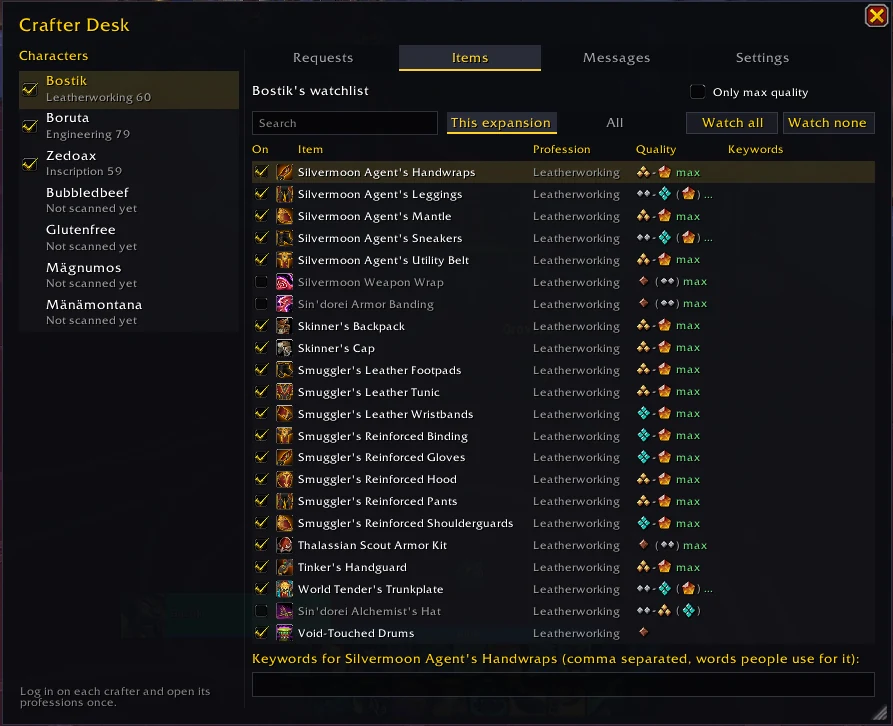
Characters, items and messages
Tick which characters to watch for. Click one for its Items (each recipe on or off, the quality it makes, your keywords) and its Messages (your replies, with {name}, {item}, {quality}, {commission} and more).
Greeting
Greet whispers one reply in your tone (Friendly, Short or Formal) that answers what they asked. Hover it to read it first, right-click for another wording.
- Never automatic: one click per whisper, one greeting per request.
- Not to the same person for the same thing within 10 minutes, and at most 5 a minute.
The desk button
It lights up with a count when a request comes in. Left-click greets, middle-click whispers, right-click dismisses, Shift-click opens the desk. Key bindings are under Key Bindings > AddOns.
Didn't find your answer?
Ask in the CtrlShiftZed Discord. Questions there help make this wiki better for everyone.
