
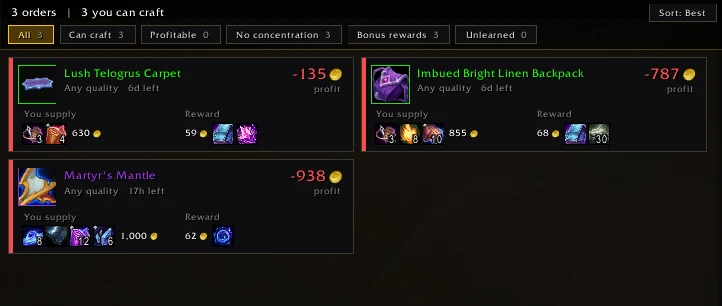
Patron Planner turns the Crafting Orders tabs into cards that show, for every order, what your materials cost, what the reward is worth, the profit, and whether you can reach the quality asked for.
Install
- CurseForge app: search for Patron Planner and click Install.
- By hand: download it from CurseForge and put the folder in
World of Warcraft\_retail_\Interface\AddOns. - Start the game, or type
/reload.
First use
- Go to a Crafting Orders table in your profession's city.
- Pick a tab: Patron, Personal, Guild or Public.
- The orders show as cards. See Reading an order card.
There's no setup. For the gold columns you need a price addon: Auction Coach, TradeSkillMaster or Auctionator. See Prices and values.
Prefer Blizzard's list? Click the button beside the order tabs, or type /patronplanner classic. Switch back with /patronplanner cards.
Didn't find your answer?
Ask in the CtrlShiftZed Discord. Questions there help make this wiki better for everyone.
